
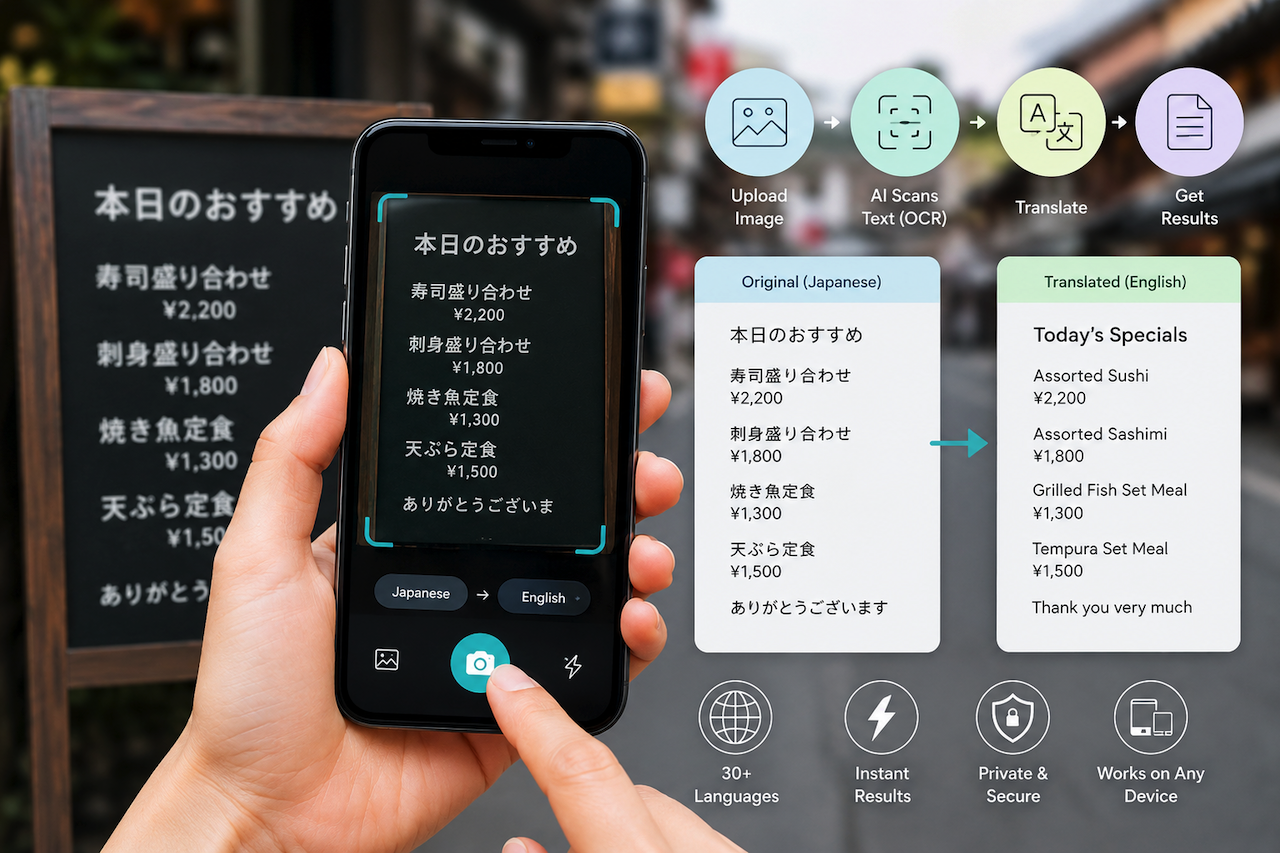
Have you ever taken a photo of a restaurant menu abroad and had absolutely no idea what you were looking at? Or maybe you received a document in a foreign language and didn't know where to start? You're not alone. Language barriers are a daily frustration for millions of people, travelers, students, business professionals, and developers alike.
The good news? AI has made it remarkably simple to break those barriers. Today, you don't need to be a language expert or install heavy software to understand text in foreign images. With modern AI photo translators, you can instantly extract text from image files and convert them into your native language, all in a matter of seconds.
In this guide, we'll walk you through how these tools work, who they're for, and how you can start using them to save time and communicate better both online and in the real world.
What Exactly Is an AI Photo Translator?
An AI photo translator is an online or app-based tool that combines two powerful technologies: Optical Character Recognition (OCR) and AI-powered language translation. Let's break that down:
- OCR (Optical Character Recognition): This is the technology that reads text inside an image. Think of it as teaching a computer to "see" words the way a human eye does. It scans the image, identifies letters and numbers, and converts them into digital text.
- AI Translation Engine: Once the text is extracted, the AI translates it into your chosen language, much like Google Translate, but smarter and context-aware.
Together, these two technologies create a seamless experience. You upload a photo, and within seconds, you have readable, translated text. No copy-pasting, no manual typing, no frustration.
Why Do People Need to Extract Text from Images?
Can't I type the text manually? Technically, yes. But here's the reality: not everyone has the time, language skills, or ability to do that. Let's look at some real-world scenarios where the ability to extract text from image content makes a massive difference.
- Travelers Abroad: When you're in a foreign country, you encounter text everywhere on signs, menus, product labels, and transportation boards. Taking a photo and instantly getting a translation helps you navigate confidently without relying on a local guide or slow internet searches.
- Students and Researchers: Students often come across academic papers, textbooks, or reference materials in languages they don't speak. Instead of retyping entire paragraphs, they can snap a photo and extract the text for translation, saving hours of tedious work.
- Business Professionals: Working with international clients? You may receive contracts, invoices, or reports in another language. Being able to extract text from a scanned image or photo of a document helps you understand content quickly and respond professionally.
- Content Creators and Developers: Web developers building multilingual platforms often need to process text from screenshots, UI mockups, or foreign-language assets. An AI OCR tool that can extract text from photos helps significantly streamline the localization process.
- Everyday Curiosity: Sometimes you want to know what a tattoo in Japanese says, or what's written on a vintage poster. AI photo translators make satisfying everyday curiosity effortless and fun.
How Does the Process Actually Work?
- Upload or Capture an Image: Users can upload a photo, screenshot, scanned document, or other supported image format into the translation tool.
- AI Scans the Text: The OCR engine identifies and analyzes the text contained within the image. Many modern systems can recognize printed text, handwriting, and text captured at different angles.
- Text Extraction: The system can extract text from an image and convert the detected content into editable digital text, making it searchable, copyable, and translatable.
- Language Processing and Translation: The extracted text is processed through an AI-powered translation engine that converts the content into the selected language.
- Display the Results: The translated output is presented in a readable format that users can review, copy, download, or use in other workflows.
Online vs. Offline: Which Option Is Right for You?
One question people often ask is whether to use an online tool or an offline app. Here's a quick breakdown to help you decide.
Online AI Photo Translators
- Best for: Quick, one-off translations on any device.
- Pros: No installation needed, always up to date, accessible anywhere.
- Cons: Requires an internet connection.
Offline Apps
- Best for: Travelers in areas with poor connectivity.
- Pros: Works without internet after language packs are downloaded.
- Cons: Takes up device storage, needs initial setup.
For most everyday users, an online tool is the fastest and most convenient choice. But if you're frequently in a low-connectivity environment, such as hiking, traveling in rural areas, or working in remote locations, an offline app is worth considering.
Tips for Getting the Best Results
To get the most accurate text extraction and translation, keep these simple tips in mind:
- Use Clear, High-Quality Images: The sharper the image, the more accurately the OCR engine reads the text.
- Avoid Extreme Angles: Try to photograph text straight-on rather than at a steep angle.
- Good Lighting Matters: Dark or shadowy images reduce accuracy. Natural or even artificial lighting helps.
- Crop to the Text Area: If your image has a lot of background clutter, crop it to focus on the text you want extracted.
- Double-Check Sensitive Content: AI translation is excellent but not perfect. For legal, medical, or business documents, always have a human verify the translation.
Final Thoughts
Language should never be a wall that stops you from accessing information, communicating clearly, or exploring the world. Thanks to AI photo translators, that wall is coming down one image at a time.
Whether you're a traveler trying to decode a foreign menu, a student wrestling with a research paper, or a developer managing multilingual content, the ability to extract text from image files and translate it instantly is a genuine superpower in today's connected world.
Featured Image generated by ChatGPT.
Share this post
Author

Leave a comment
All comments are moderated. Spammy and bot submitted comments are deleted. Please submit the comments that are helpful to others, and we'll approve your comments. A comment that includes outbound link will only be approved if the content is relevant to the topic, and has some value to our readers.
Comments (0)
No comment