
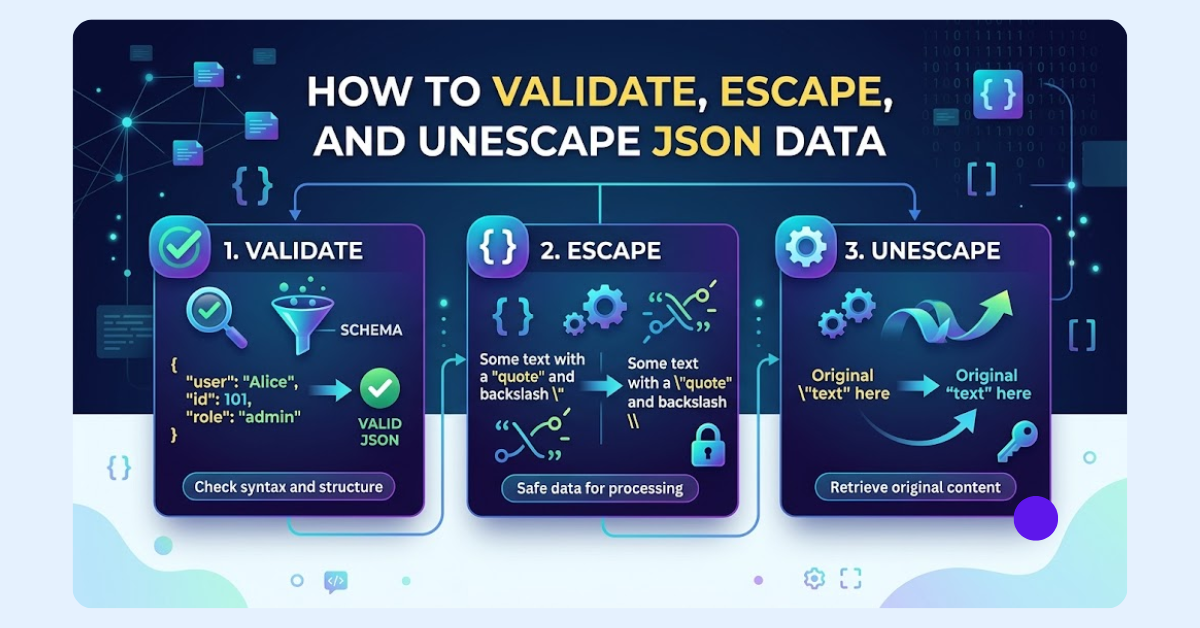
JSON is a widely used data format for exchanging and storing information between APIs, applications, and databases. While JSON is simple and lightweight, developers often face challenges like invalid syntax, escaped characters, and unreadable JSON strings. Understanding JSON validation, escaping, and unescaping is essential for processing data correctly and avoiding parsing errors.
JSON validation checks whether data follows proper JSON rules, while JSON escaping converts special characters like quotes and backslashes into a safe format. JSON unescaping reverses this process, turning escaped strings back into readable and usable data.
In this guide, you will learn how to validate, escape, and unescape JSON data, fix common JSON issues, and use practical methods to handle JSON efficiently.
What Is JSON Data? Understanding Structure and Common Issues
JSON (JavaScript Object Notation) is a lightweight data format used to store and exchange information between applications, servers, and systems. It is commonly used in APIs, web applications, databases, and configuration files because it is easy for both humans and machines to read. JSON represents data in a structured format using key-value pairs, arrays, and objects.
A basic JSON object consists of keys and values enclosed in curly brackets {}. Keys are always written inside double quotes, while values can be strings, numbers, booleans, arrays, objects, or null values. Example:
{
 "name": "John",
 "age": 30,
 "active": true
}
Although JSON is simple to work with, developers often encounter issues when handling JSON data. Common problems include invalid syntax, missing commas, incorrect quotation marks, unsupported characters, and improper escape sequences. Developers may also face escaped JSON strings where characters like \" or \\ appear because the data has been converted into a safe string format.
Other challenges include nested JSON objects, double-escaped JSON, and parsing errors when data is received from APIs or stored in databases. Understanding JSON structure and these common issues is the first step toward validating, escaping, and unescaping JSON data correctly.
What Is JSON Validation? How to Validate JSON Data
JSON validation is the process of checking whether JSON data follows the correct syntax rules and structure defined by the JSON standard. Before using JSON data in an application, API, or database, validation helps ensure that the data is properly formatted and can be processed without errors.
Validating JSON is important because even a small formatting mistake, such as a missing comma or incorrect quotation mark, can cause parsing failures. When applications receive JSON from external sources like APIs, user inputs, or database exports, validating the data first helps prevent unexpected errors and improves data reliability.
Common JSON Validation Rules
To be considered valid, JSON data must follow specific formatting rules:
- Keys and strings must use double quotes: JSON requires double quotation marks around object keys and string values. Single quotes are not valid JSON.
{ "name": "John" } - Proper brackets and commas: Objects must use curly brackets {}, arrays must use square brackets [], and items must be separated correctly with commas.
- Valid data types: JSON supports specific data types, including strings, numbers, objects, arrays, booleans (true or false), and null.
- Correct escape sequences: Special characters such as quotes, backslashes, and line breaks must use valid JSON escape sequences like \", \\\\, and \n.
- No trailing commas: JSON does not allow extra commas after the last item in an object or array.
Common Invalid JSON Examples
Developers often encounter invalid JSON because of small syntax mistakes. Some common examples include:
Missing quotation marks:
Invalid: {  name: "John" }
Valid: {  "name": "John"}
Extra commas:
Invalid: { "name": "John",}
Incorrect escaping:
Invalid: {  "message": "He said "Hello""}
Valid: {  "message": "He said \"Hello\""}
Unclosed objects or arrays:
Invalid JSON with missing closing brackets can prevent the parser from reading the data correctly.
How to Validate JSON in Different Programming Languages
Most programming languages provide built-in JSON libraries that can validate and parse JSON data.
JavaScript JSON Validation
In JavaScript, developers commonly use JSON.parse() to check whether a JSON string is valid. If the JSON format is incorrect, the method throws an error.
Example:
try {
  const data = JSON.parse('{"name":"John"}');
  console.log(data);
} catch (error) {
  console.log("Invalid JSON");
}
Using a try-catch block helps handle JSON parsing errors without breaking the application.
Python JSON Validation
Python provides the built-in json module for validating JSON data. The json.loads() function converts a JSON string into a Python object and raises a JSONDecodeError if the format is invalid.
Example:
import json
try:
    data = json.loads('{"name":"John"}')
    print(data)
except json.JSONDecodeError:
    print("Invalid JSON")
Go JSON Validation
In Go, developers can use the encoding/json package and the json.Unmarshal() function to validate JSON data.
Example:
var data map[string]interface{}

err := json.Unmarshal([]byte(`{"name":"John"}`), &data)
if err != nil {
    fmt.Println("Invalid JSON")
}
If the JSON structure is incorrect, json.Unmarshal() returns an error.
Using Online JSON Validators
Online JSON validators help quickly check whether JSON data is correctly formatted and follows proper syntax rules. They are useful for finding errors like missing commas, incorrect quotes, and invalid brackets without manually reviewing large JSON structures.
- Paste your JSON code into the validator input box.
- Click the validate or check button to analyze the data.
- Review any highlighted syntax errors or formatting issues.
- Fix the detected errors and validate the JSON again.
- Use the validated JSON safely in your application, API, or database workflow.
What is JSON Escaping and Unescaping?
JSON escaping and unescaping are essential processes for handling JSON strings that contain special characters. When JSON data includes characters like double quotes, backslashes, or line breaks, they can interfere with the structure of the data. JSON escaping converts these special characters into safe escape sequences, while JSON unescaping reverses the process and restores the original readable content.
Understanding both processes helps developers store, transmit, and process JSON data correctly, especially when working with APIs, databases, configuration files, and nested JSON objects.
What Is JSON Escaping?
JSON escaping is the process of converting special characters inside a JSON string into their escaped equivalents. This ensures that these characters do not break the JSON structure or cause parsing errors.
For example, a double quote inside a string must be escaped because JSON uses double quotes to define strings.
Before escaping:
{
 "message": "He said "Hello""
}
This JSON is invalid because the inner quotes are not escaped.
After escaping:
{
 "message": "He said \"Hello\""
}
The escaped version keeps the JSON structure valid and allows the data to be processed correctly.
Why Do Special Characters Need Escaping?
JSON has specific syntax rules, and certain characters have special meanings. Escaping tells the JSON parser that these characters are part of the data value rather than part of the JSON structure. Without proper escaping, special characters can make JSON invalid and lead to parsing errors. Here are some common cases where JSON escaping is required:
- Storing JSON data inside another JSON string
- Sending JSON through APIs
- Saving JSON content in databases
- Writing JSON data to log files
- Creating configuration files with text values
Common JSON Escape Sequences
JSON supports several escape sequences for representing special characters safely:
| Character | Escape Sequence |
|---|---|
| Double quote (") | \" |
| Backslash (\) | \\ |
| Newline | \n |
| Tab | \t |
| Carriage response | \r |
| Unicode characters | \uXXXX |
These escape sequences allow JSON strings to contain characters that would otherwise affect the data structure.
Why JSON Data Gets Escaped
JSON data is commonly escaped when it needs to be stored or transferred in a different context. Some common scenarios include:
Storing JSON Inside Another JSON String: When one JSON object is stored as a string value inside another JSON object, the inner quotes must be escaped. Example:
{
 "data": "{\"name\":\"John\"}"
}
API Responses Containing JSON Strings: Some APIs return JSON data inside a string field. The nested JSON needs escaping to remain valid within the outer response.
Database Storage: Applications often store JSON data in text-based database fields. Escaping helps preserve the structure when saving JSON as plain text.
Log Files: Logging systems may escape JSON data before storing it to prevent formatting issues and keep logs readable.
Configuration Files: Configuration values containing quotes, line breaks, or special characters may require escaping to avoid errors.
Example of Escaped JSON
Before escaping:
{
 "name": "John",
 "message": "Hello \"World\""
}
After converting the entire JSON object into a string:
"{\"name\":\"John\",\"message\":\"Hello \\\"World\\\"\"}"
The escaped version can now safely be stored as a string value or transmitted inside another JSON structure.
What Is JSON Unescaping?
JSON unescaping is the reverse process of JSON escaping. It converts escaped characters back into their original format, making JSON strings easier to read and use within applications. For example:
- \" → "
- \\ → \
- \n → New line
When developers receive escaped JSON from an API, database, or log file, unescaping helps convert it back into a usable JSON object or readable text.
When Developers Need JSON Unescaping
JSON unescaping is commonly required in situations such as:
- Processing API responses: Some APIs return JSON objects as escaped strings that need to be parsed before use.
- Reading database JSON fields: Stored JSON strings may contain escape characters that need to be removed.
- Debugging logs: Unescaping makes complex log entries easier to understand.
- Working with nested JSON: Inner JSON objects often need additional parsing after being extracted.
- Converting escaped JSON into usable objects: Applications need readable data structures instead of encoded strings.
How to Escape and Unescape JSON Data
Most programming languages provide built-in JSON functions that safely handle escaping and unescaping.
JavaScript
JavaScript uses JSON.stringify() to escape JSON data and JSON.parse() to unescape and convert JSON strings back into objects.
Escaping:
const data = {
 message: 'Hello "World"'
};
const escaped = JSON.stringify(data);
Unescaping:
const original = JSON.parse(escaped);
Python
Python provides the json module for JSON handling.
- json.dumps() → Escapes Python objects into JSON strings
- json.loads() → Unescapes and parses JSON strings
Example:
import json
escaped = json.dumps({"message": 'Hello "World"'})
original = json.loads(escaped)
PHP
PHP uses built-in JSON functions:
- json_encode() → Escapes data into JSON format
- json_decode() → Unescapes and converts JSON data back into PHP values
Go
Go provides JSON handling through the encoding/json package:
- json.Marshal() → Escapes and converts data into JSON
- json.Unmarshal() → Unescapes and parses JSON data
Using built-in JSON methods is always recommended because manual replacements can easily create errors with complex escape sequences.
By Using Online Json Escape & Unescape tool
An online Escape and Unescape JSON tool helps you quickly convert, clean, and format JSON data without writing code. It is useful for developers working with APIs, databases, and JSON strings. Follow these simple steps to use the tool:
- Add your JSON data by pasting code, uploading a file, dragging and dropping, or fetching JSON from a URL.
- Automatic detection identifies whether your JSON is escaped or unescaped and suggests the right action.
- Click “Unescape JSON” to remove escape characters and make JSON readable, or choose “Escape JSON” to prepare data for storage or API transmission.
- Use Beautify to format JSON for easier reading or Minify to reduce file size.
- Copy the result or download it as a .json file.
Common JSON Escaping and Unescaping Mistakes
Working with JSON escaping and unescaping can sometimes lead to unexpected errors, especially when handling API responses, database data, or nested JSON strings. Understanding common mistakes helps developers avoid parsing issues and manage JSON data correctly.
- Using Manual String Replacement Instead of JSON Methods
A common mistake is trying to escape or unescape JSON using manual replacements like changing \" to " with simple string functions. This approach can fail when dealing with complex escape sequences, backslashes, or nested JSON.
Instead, use built-in JSON methods like JSON.parse(), JSON.stringify(), json.loads(), or json.dumps() for reliable results.
- Double Escaping JSON Data
Double escaping happens when JSON is escaped more than once, usually because of multiple serialization steps.
Example: {\"name\":\"John\"} becomes: {\\\"name\\\":\\\"John\\\"} This often occurs when JSON.stringify() or similar functions are called multiple times. To fix it, parse the JSON one layer at a time until the original data is restored.
- Confusing JSON Escaping With URL Encoding
JSON escaping and URL encoding are different processes. For example:
- JSON escaping: \"
- URL encoding: %22
Using the wrong decoding method can cause errors. Always identify whether your data is JSON escaped or URL encoded before processing it.
- Unescaping Already Valid JSON
Developers sometimes try to unescape JSON that is already in the correct format. This can create unnecessary errors or change the data structure.
Before unescaping, check whether the data actually contains escape sequences like \\, \", or \n.
- Ignoring JSON Parsing Errors
Invalid JSON can cause parsing failures in applications. Always handle errors when using JSON parsing functions to prevent unexpected crashes.
For example, use try-catch in JavaScript or handle JSONDecodeError in Python when processing external JSON data.
By avoiding these common mistakes and using proper JSON handling methods, developers can work with escaped and unescaped JSON data more efficiently and reduce debugging time.
Conclusion
Handling JSON data correctly is essential for building reliable applications, APIs, and data workflows. JSON validation helps ensure your data follows the correct structure, while escaping protects special characters and keeps JSON strings valid. Unescaping, on the other hand, converts escaped JSON back into a readable and usable format.
By understanding common JSON issues, using built-in programming methods, and avoiding mistakes like double escaping or manual string replacements, developers can process JSON data more efficiently and reduce parsing errors. Whether you are debugging API responses, working with databases, or managing configuration files, proper JSON handling saves time and improves data accuracy.
For quick conversions, an online JSON Escape and Unescape tool can simplify the process by helping you validate, escape, unescape, format, and manage JSON data without writing additional code.
Share this post
Author

Read the latest articles from jackson miller
How to Create Side-by-Side Comparison Images Online

July 1, 2026
Creating a side-by-side comparison image is one of the most effective ways to present visual information. By placing two or more photos in a single layout, you can clearly highlight differences, improvements, features, or progress without making viewers switch between separate files.
Learn moreLeave a comment
All comments are moderated. Spammy and bot submitted comments are deleted. Please submit the comments that are helpful to others, and we'll approve your comments. A comment that includes outbound link will only be approved if the content is relevant to the topic, and has some value to our readers.
Comments (0)
No comment