
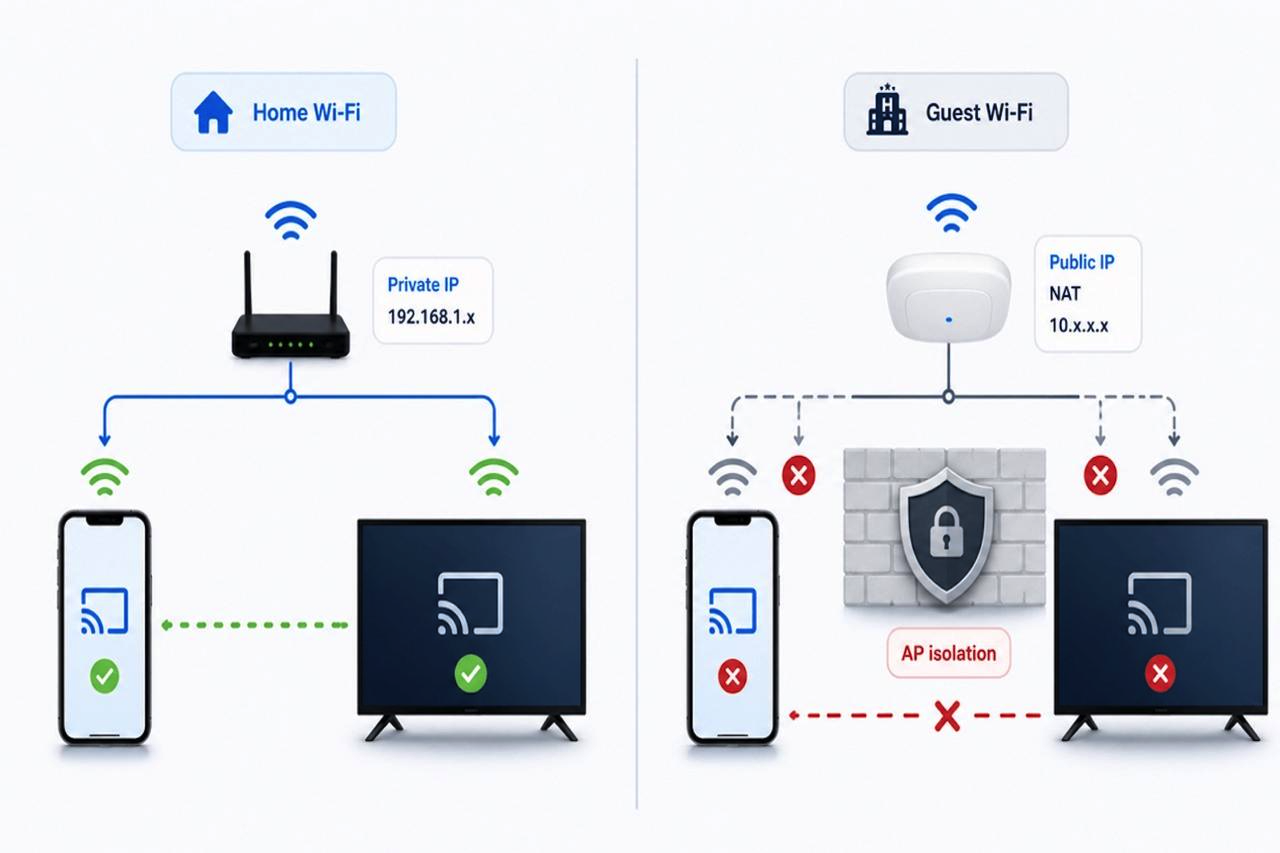
Casting a video from your phone to a TV feels simple. Both devices are connected to Wi-Fi, so the phone should be able to find the TV and send the video to it.
At home, this usually works. In a hotel, coffee shop, airport, dorm, or office guest network, it often fails.
The reason is usually not the casting app or the TV. It is the network. Casting depends on local device discovery, and many public Wi-Fi networks block devices from seeing each other.
The Short Answer
Casting works best when your phone and TV are on the same private local network.
At home, your phone might have an address like 192.168.1.25, and your TV might have 192.168.1.40. Because both devices are on the same local network, they can usually discover each other.
In a hotel or coffee shop, Wi-Fi devices may be connected to the internet but blocked from communicating with each other. This security feature protects guests, but it also breaks casting.
Public IP vs. Private IP
A public IP address is the internet-facing address assigned to a router or network. Websites and online services see this address when devices connect to them.
A private IP address is used inside a local network. Common private IP ranges include:
- 10. x.x.x
- 172.16.x.x to 172.31.x.x
- 192.168.x.x
Your home router usually has one public IP address, while your phone, TV, laptop, and other devices each get private IP addresses. NAT, or Network Address Translation, lets all those private devices share a single public IP address when accessing the internet.
This works well for web browsing, but casting needs more than internet access. Your phone must also be able to reach the TV inside the private network.
Why Casting Needs Local Discovery
Most casting systems rely on local network discovery. Your phone sends out a request to find nearby TVs, streaming sticks, or media receivers.
This discovery can use protocols such as:
- mDNS, often used by Chromecast, AirPlay, and Bonjour-style discovery
- SSDP, used by UPnP and DLNA devices
- Local device APIs from TV and streaming device makers
These protocols usually require devices to be on the same subnet or broadcast domain. If the network blocks local discovery traffic, your TV may never appear in the casting list.
Why Hotel Wi-Fi Blocks Casting
Hotels, cafes, airports, and office guest networks are designed for shared access. Their main goal is to let many users access the internet safely, not to let every device discover every other device.
Common reasons casting fails on public Wi-Fi include:
- AP isolation, which blocks wireless devices from talking to each other
- Guest VLANs, which separate devices into different virtual networks
- Captive portals, which require a login before full network access
- Blocked multicast traffic, which can stop mDNS and SSDP discovery
- Different subnets for phones, TVs, and guest devices
- Firewall rules that block local control ports
These restrictions are useful for privacy. You do not want strangers on the same hotel Wi-Fi to discover your phone or laptop. But the same rules can prevent your phone from finding your TV or streaming stick.
How to Check the Problem
A quick test is to compare the private IP address of both devices.
If your phone is 192.168.1.23 and your TV is 192.168.1.55, they are probably on the same local network.
If your phone is at 192.168.1.23 and your TV is at 10.0.20.8, they are probably on different networks.
You can usually find the IP address in Wi-Fi or network settings on both devices.
Also check:
- Both devices are on the same Wi-Fi name
- VPN is turned off during discovery
- Guest mode or AP isolation is disabled if you control the router
- The TV is awake and connected
- The router allows local device communication
When a Casting App Helps
A casting app cannot override strict hotel network isolation. If the network blocks device-to-device discovery, no normal app can force the phone and TV to see each other.
But on home and trusted networks, a flexible casting app can help by supporting more receiver types and protocols. CastBrowser, for example, is a browser-based casting app for Android and iOS that helps users cast phone to TV across Chromecast, Roku, Fire TV, AirPlay, DLNA-enabled smart TVs, and browser-based receivers when the network allows local discovery.
This makes it useful when the issue is device compatibility or video detection, but the local network still has to permit communication.
Final Thoughts
Casting is not only about the app or the TV. It also depends on how the network is configured.
At home, your phone and TV usually share the same private network, so discovery works. At hotels, airports, cafes, dorms, or offices, guest Wi-Fi and local discovery are often blocked by design.
If both devices can access the internet but cannot see each other, the issue is probably not the public IP address. It is usually the private network between them.
Share this post
Leave a comment
All comments are moderated. Spammy and bot submitted comments are deleted. Please submit the comments that are helpful to others, and we'll approve your comments. A comment that includes outbound link will only be approved if the content is relevant to the topic, and has some value to our readers.
Comments (0)
No comment